 LuviDuo
Get the app
LuviDuo / Mood widget
Mood widget for couples
Updated November 15, 2026
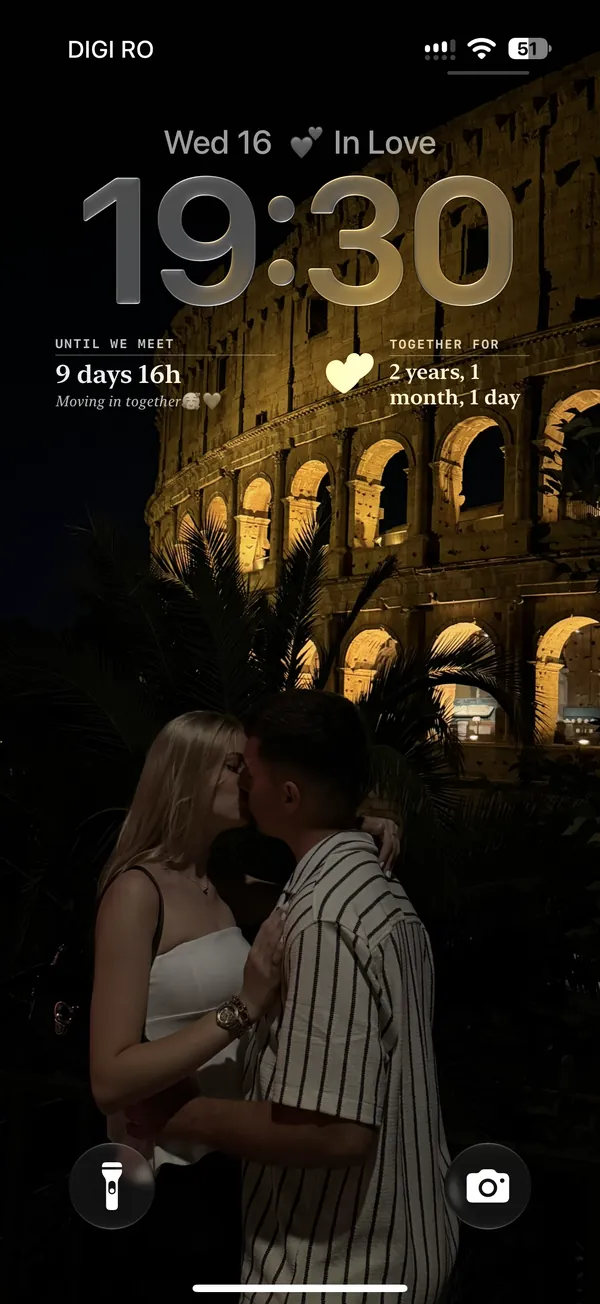
Short answer: LuviDuo's Mood Sync widget puts your partner's mood on your screen. You pick how you feel in the app, from more than 50 moods and activities, and it appears on your partner's iPhone lock screen or home screen, or on their Android home screen. Their mood shows on yours. It is free.
What the mood widget shows
Your partner's current mood, with its own little icon and a word or two. The choices go well beyond happy and sad:
- Feelings: Happy, In Love, Missing you, Excited, Relaxed, Grateful, Tired, Stressed, Anxious, Sad, Bored.
- What you are doing: Working, At the office, Studying, Cooking, Gym, Driving, Gaming, Reading, Having coffee.
- How you are: Hungry, Headache, Sick, At the doctor.
- For the two of you: Waiting for you, Hugging, Romantic.
On the iPhone lock screen it fits in the line above the clock or in a small circle. On the home screen it comes in a small and a wide size, on iPhone and Android.
How it works between two phones
- On the app's home screen, tap Mood Sync and pick how you feel.
- Your partner's widget changes to your mood. You see theirs on yours.
- Change it whenever you like. Nothing is set automatically: the widget only shows what you pick.
Small things it saves you from typing: "Studying" before an exam, so they know why you are slow to reply; "At the doctor"; "Driving"; or simply "Missing you" on a long day. For a whole widget built around that last one, see the miss you widget.
How to set it up
First, both of you
- You both install LuviDuo (iPhone or Android, any mix).
- One of you shares the couple code and the other enters it. The widget stays empty until you are connected.
- Each of you sets a mood once, so the other's widget has something to show.
iPhone lock screen
- Touch and hold the lock screen, tap Customize, then choose Lock Screen.
- Tap the row of widgets under the clock (or the line above it) and pick LuviDuo.
- Choose Mood Sync, then tap Done.
iPhone home screen
- Touch and hold an empty part of the home screen, tap Edit, then Add Widget.
- Search for LuviDuo and choose Mood Sync.
- Pick a size and tap Add Widget.
Android home screen
- Touch and hold an empty part of the home screen and tap Widgets (the name changes a little between phones).
- Find LuviDuo and drag Mood Sync onto your screen.
Other apps with a mood widget
We make LuviDuo, so we are not neutral. What we say about other apps comes from their US App Store listings, read on November 15, 2026. Check the listing before you choose.
- Couple Joy (40,293 ratings, 4.9 stars): its listing says you can share your mood and see how your partner is feeling in real time, along with distance and time together (App Store listing).
- Widgetable (388,924 ratings, 4.9 stars): its listing mentions Mood Bubble and Mood Jar for sharing emotions with friends and partners (App Store listing).
- Pookie (1,414 ratings, 4.6 stars): its listing says you can share how you feel and your partner can answer it, and one of its ten home screen widgets shows their mood (App Store listing).
Keep reading
- All couple widgets compared
- How to add a couple widget, step by step
- Miss you widget
- Distance widget for couples
What is free: LuviDuo is free to download and use, with ads. The widgets, the games and your pet are all in the free app. LuviDuo Premium is optional, covers both partners, removes the ads shown before sending moments and before games, keeps all your shared memories, and adds monthly Sparks and faster wheel energy. More in the FAQ.
Questions
- Is there a widget that shows my partner's mood?
- Yes. LuviDuo's Mood Sync widget shows your partner's current mood on your iPhone lock screen or home screen, or on your Android home screen. Your mood shows on theirs.
- What moods can I choose?
- More than 50, from feelings like Happy, In Love, Missing you, Tired or Stressed to activities like Working, Studying, Cooking, Gym or Driving.
- Does the mood widget work on the lock screen?
- On iPhone, yes: in the line above the clock or as a small circle. Android has it as a home screen widget.
- Is the mood set automatically?
- No. It shows only the mood you pick in the app, and you can change it whenever you like.
- Is the mood widget free?
- Yes. All LuviDuo widgets are in the free app.
Try LuviDuo together
Free on iPhone and Android. Both of you install it, then connect with your couple code.